
Manufacturing ERP Implementation Guide: A Step-by-Step Approach for Modern Factories
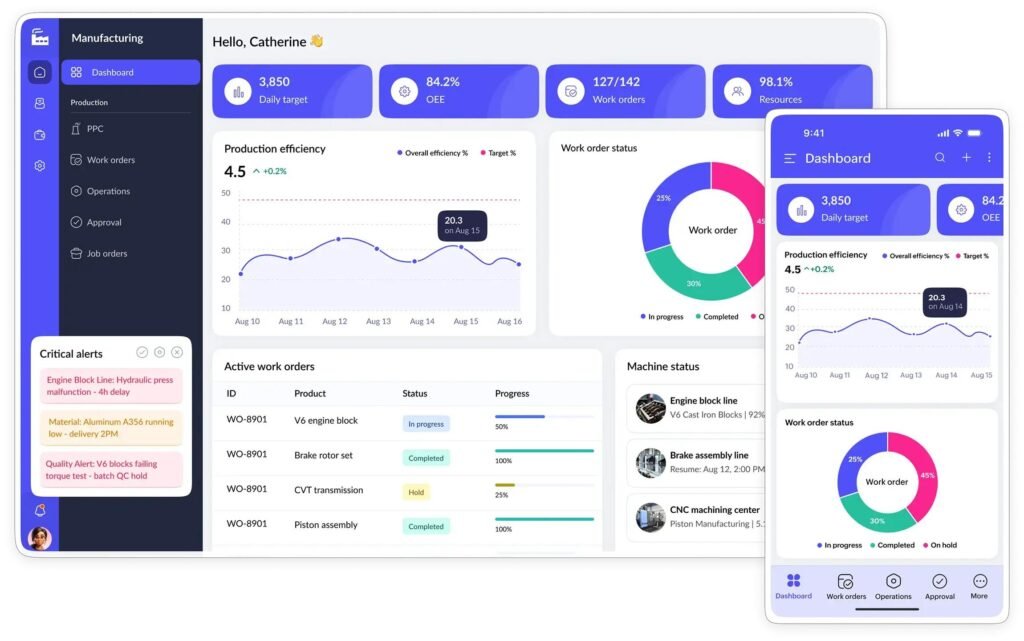
Manufacturing Enterprise Resource Planning (ERP) systems have become essential for companies looking to improve productivity, reduce operational costs, and gain real-time visibility into production. However, implementing an ERP system is one of the most challenging digital transformation projects a manufacturing company can undertake.
Without proper planning, ERP implementation can exceed budgets, delay production, and create frustration among employees. With the right strategy, however, manufacturers can significantly improve inventory control, production scheduling, procurement, finance, and overall operational efficiency.
This Manufacturing ERP Implementation Guide explains every stage of the implementation process, common challenges, and best practices to ensure project success.
What Is Manufacturing ERP?
Manufacturing ERP is an integrated software platform that connects every major department within a factory. Instead of using separate systems for purchasing, inventory, finance, production, and sales, ERP centralizes all business information into a single database.
Typical ERP modules include:
- Inventory Management
- Production Planning
- Procurement
- Sales
- Accounting
- Quality Management
- Warehouse Management
- Maintenance Management
Because every department shares the same data, decision-makers gain real-time visibility into factory operations.
Why ERP Implementation Often Fails
Research consistently shows that ERP projects can fail due to organizational issues rather than software limitations.
Common reasons include:
- Poor project planning
- Lack of executive support
- Unrealistic implementation timelines
- Inadequate employee training
- Poor data migration
- Resistance to organizational change
These risks can be reduced through structured implementation planning.
Step 1: Define Business Objectives
Before selecting any ERP software, companies should clearly define their goals.
Examples include:
- Reduce inventory costs
- Improve production scheduling
- Increase delivery accuracy
- Reduce manual data entry
- Improve financial reporting
Clear objectives help determine whether implementation is successful.
Step 2: Build the Right Project Team
Successful ERP implementation requires cross-functional collaboration.
Typical project members include:
- Executive Sponsor
- ERP Project Manager
- IT Team
- Production Manager
- Finance Manager
- Procurement Team
- Warehouse Manager
Each department should participate during planning and testing.
Step 3: Analyze Existing Processes
Avoid simply transferring inefficient processes into the new ERP system.
Instead, evaluate:
- Procurement workflow
- Production planning
- Inventory management
- Quality control
- Shipping procedures
Many companies use ERP implementation as an opportunity to redesign inefficient workflows.
Step 4: Choose the Right ERP Deployment
Manufacturers typically choose between:
Cloud ERP
Advantages:
- Lower upfront investment
- Automatic updates
- Faster deployment
- Easier remote access
Disadvantages:
- Subscription costs
- Internet dependency
On-Premise ERP
Advantages:
- Full infrastructure control
- Greater customization
- Internal security management
Disadvantages:
- Higher capital investment
- Longer implementation time
The right deployment depends on business size, compliance requirements, and IT capabilities.
Step 5: Data Migration
Clean data is essential.
Before migration:
- Remove duplicate records
- Verify supplier information
- Validate inventory data
- Archive obsolete products
Poor-quality data can negatively affect the entire ERP system.
Step 6: Employee Training
Technology alone does not guarantee success.
Training should include:
- Production operators
- Warehouse staff
- Purchasing teams
- Finance users
- Supervisors
Employees should practice using the system before the official go-live date.
Step 7: Testing Before Go-Live
Never launch ERP without testing.
Recommended testing includes:
- Inventory transactions
- Purchase orders
- Sales orders
- Production scheduling
- Financial reporting
Testing reduces implementation risks.
Step 8: Go Live and Continuous Improvement
Implementation is only the beginning.
Monitor:
- System performance
- User adoption
- Inventory accuracy
- Production efficiency
- Customer delivery performance
Continuous optimization ensures long-term ERP success.
Common ERP Implementation Challenges
Manufacturers frequently encounter:
- Budget overruns
- Schedule delays
- Employee resistance
- Incorrect master data
- Integration problems
- Lack of executive commitment
Recognizing these risks early improves project outcomes.
ERP Implementation Best Practices
Successful manufacturers often:
- Establish realistic timelines
- Train employees continuously
- Maintain executive involvement
- Standardize business processes
- Monitor implementation KPIs
- Work closely with ERP consultants
Conclusion
Implementing Manufacturing ERP is a strategic investment that affects every department within a manufacturing company. While implementation requires careful planning, proper training, and organizational commitment, the long-term benefits include improved efficiency, lower operating costs, better decision-making, and greater competitiveness.
Companies that follow a structured implementation strategy are far more likely to achieve successful ERP adoption and maximize their return on investment.
SEO Checklist
- Focus Keyword: Manufacturing ERP Implementation Guide
- URL Slug:
manufacturing-erp-implementation-guide - Meta Description: Sudah disediakan.
- Internal Link: Tambahkan link ke artikel pertama Cloud ERP vs On-Premise ERP.
- External Link: Tambahkan 1 tautan ke sumber tepercaya seperti Wikipedia (ERP) atau situs resmi vendor ERP.

Pingback: What Is Manufacturing ERP? A Complete Beginner's Guide (2026) - Factory Insights Hub